

Subscription Model Infrastructure for Recurring Revenue
We moved Waqtly from a one-time hardware sale to a subscription model. Each plan is linked to a Welcome Code, payment is set up in the Remote app with Stripe, and each tablet reads its access level from the CRM, with a cached copy for offline use.
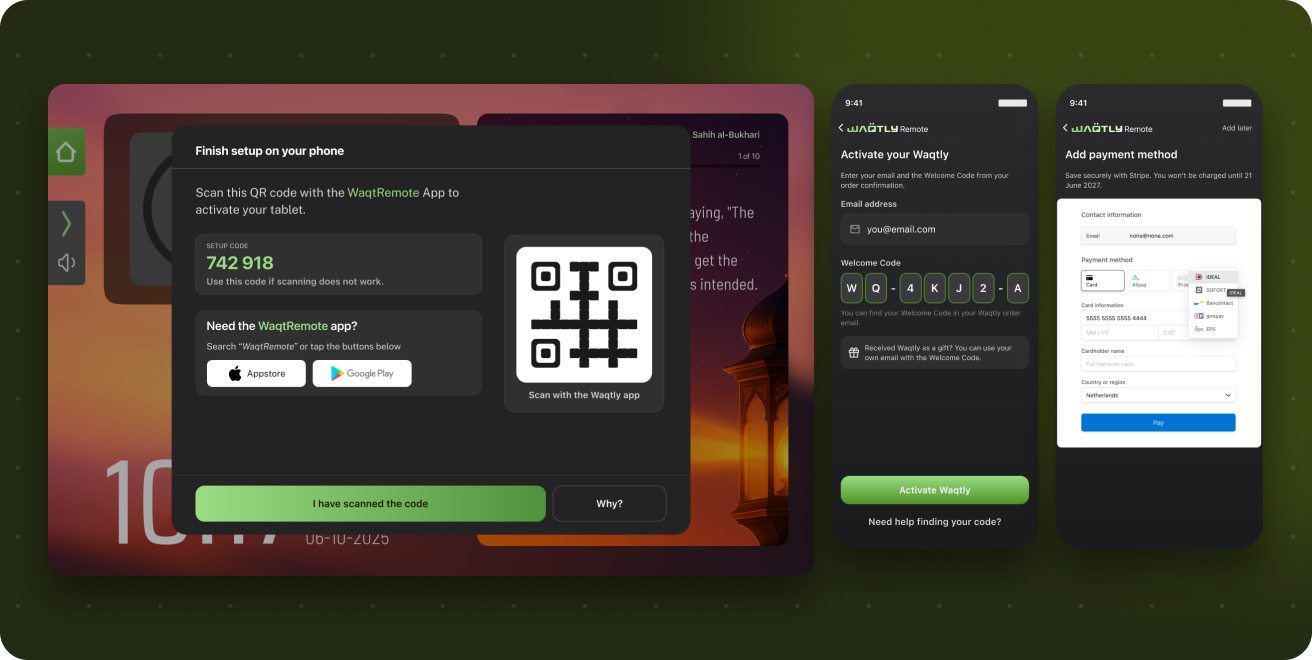
The high one-time price limited sales.
Waqtly was sold as a single, high-priced purchase. This limited who could buy it, ended the customer relationship at checkout, and gave no recurring revenue to pay for new content, prayer-time sources and software updates.
We redesigned the pricing model and the systems behind it.
We designed the plans, the activation flow and the entitlement logic together, so the store, the tablet, the Remote app, Stripe and the back office all use the same access rules.
The subscription model is live, existing owners were not affected, and revenue is now recurring.
Two plans are on sale in the store, devices activate with a Welcome Code, payment is handled in the app through Stripe, every device sold before launch kept full access with no action from its owner, and new customers are buyers who pay monthly.
Buy-once versus always-on
Model: Two plans, selected at checkout.
The customer orders a tablet with a plan. The plan is linked to the Welcome Code, so nothing has to be chosen during setup. There are four store SKUs, Nano and Plus with either plan, and each SKU has its own code pool.
Subscription
Defaultone-time, then €7.99/month after the included months
- 6 months of full access included
- Payment method added in the Remote app, and it can be skipped
- Cancel anytime from the app
- Azan always stays free
Lifetime access
one-time, no subscription
- Every feature, no expiry date
- No payment step at activation
- No billing events, no renewal emails
- Suitable for gifts and family purchases
Original access
for every device sold before launch
- Pre-flagged as grandfathered in the CRM
- Always gets full access from the CRM
- No registration, no new account
- No changes for existing owners at launch
How it works from the order to activated tablet.
Five systems are involved, and the CRM is the source of truth. Shopify only handles the order. The subscription is created during onboarding in the Remote app, with payment through Stripe.
What we built: Twelve components of the subscription system.
These components cover the tablet, the Remote app, the CRM service and the back office, and were released together.
Welcome Code system
Each device ships with a pre-generated, easy-to-read code that holds its plan and model. Codes are stored in one pool per SKU and go through a fixed lifecycle. They are validated on the server and are not case-sensitive.
WQ-4KJ2-AOrder webhooks
When an order is placed, Shopify calls the CRM. The CRM verifies the signature, reads each line item by SKU, reserves one code per device and returns the codes for the confirmation email.
 03 · Handover
Tablet-to-phone QR handover
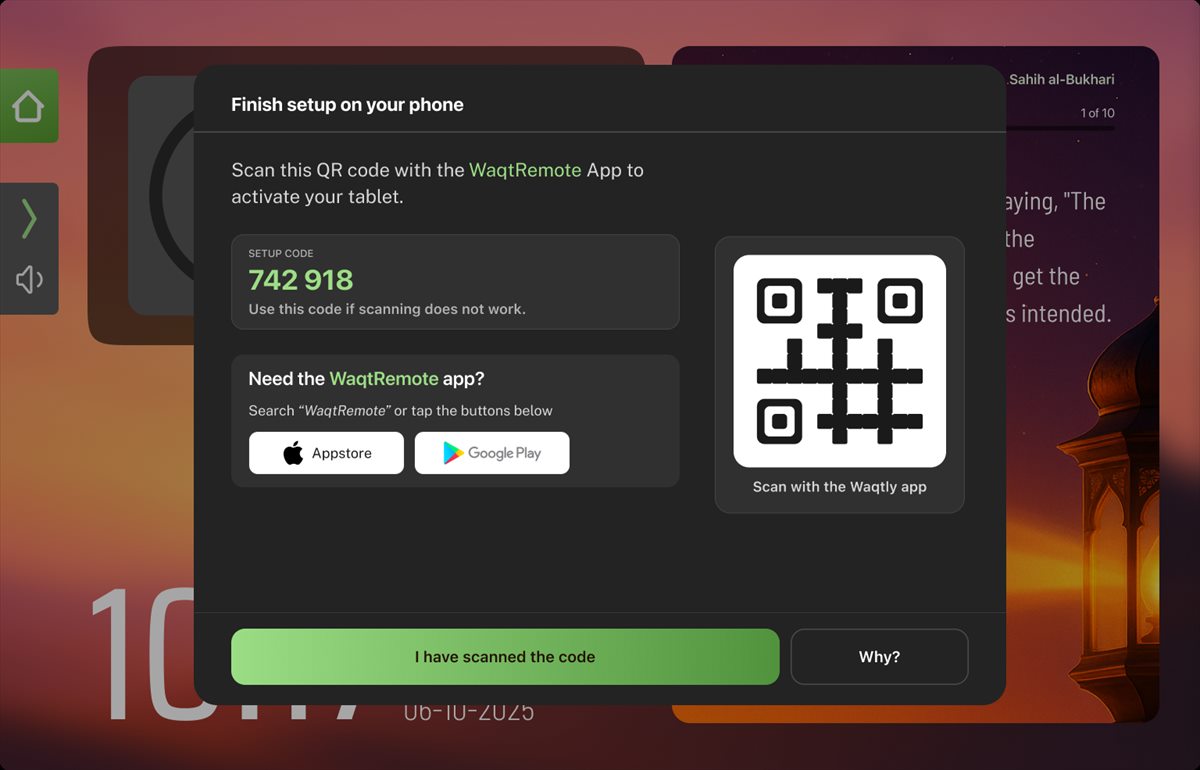
The tablet completes its own onboarding, then shows a QR code and a backup setup code for the Remote app. The tablet only shows progress and unlocks; email and payment details are entered on the phone.
In-app payments with the Stripe SDK
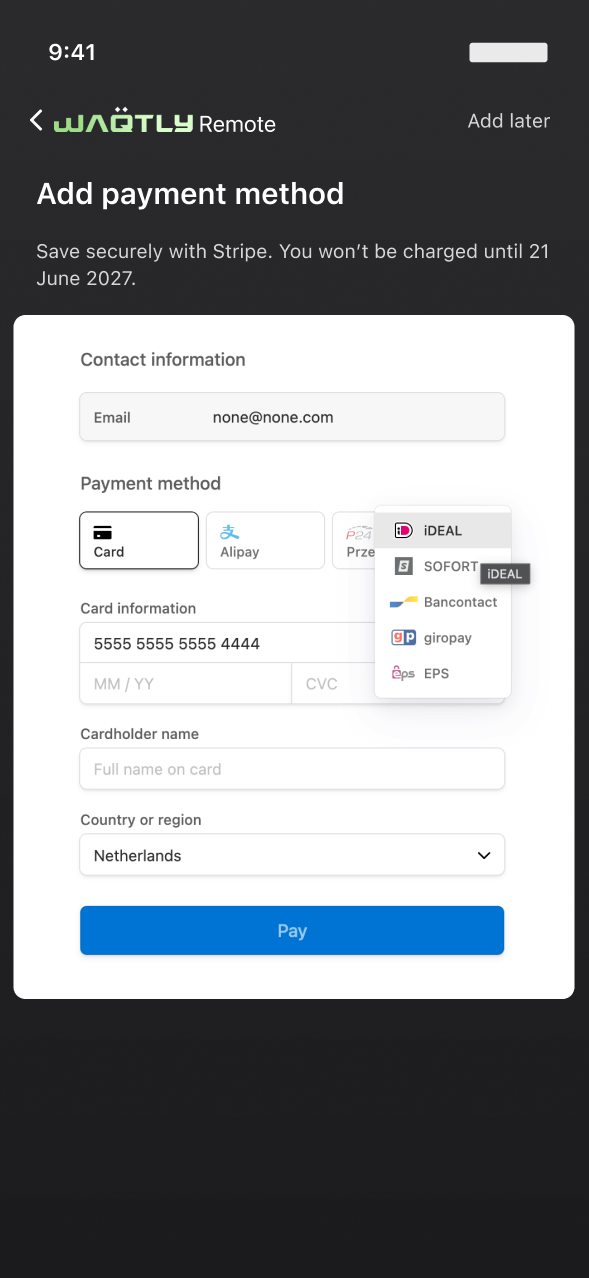
The Remote app uses Stripe's mobile SDK. A SetupIntent saves the card without charging it, so billing starts only after the included months. The user can skip this step and add a card later. Card data never reaches our servers.
Billing by webhook
Stripe runs the monthly billing. The CRM receives Stripe's webhooks, verifies each signature and updates the device record.
- invoice.paid
- mark active, set next billing date
- invoice.payment_failed
- notify the user, flag the payment
- subscription.updated
- sync plan and state
- subscription.deleted
- Azan only at next check-in
 06 · Entitlements
Feature gating with Azan always on
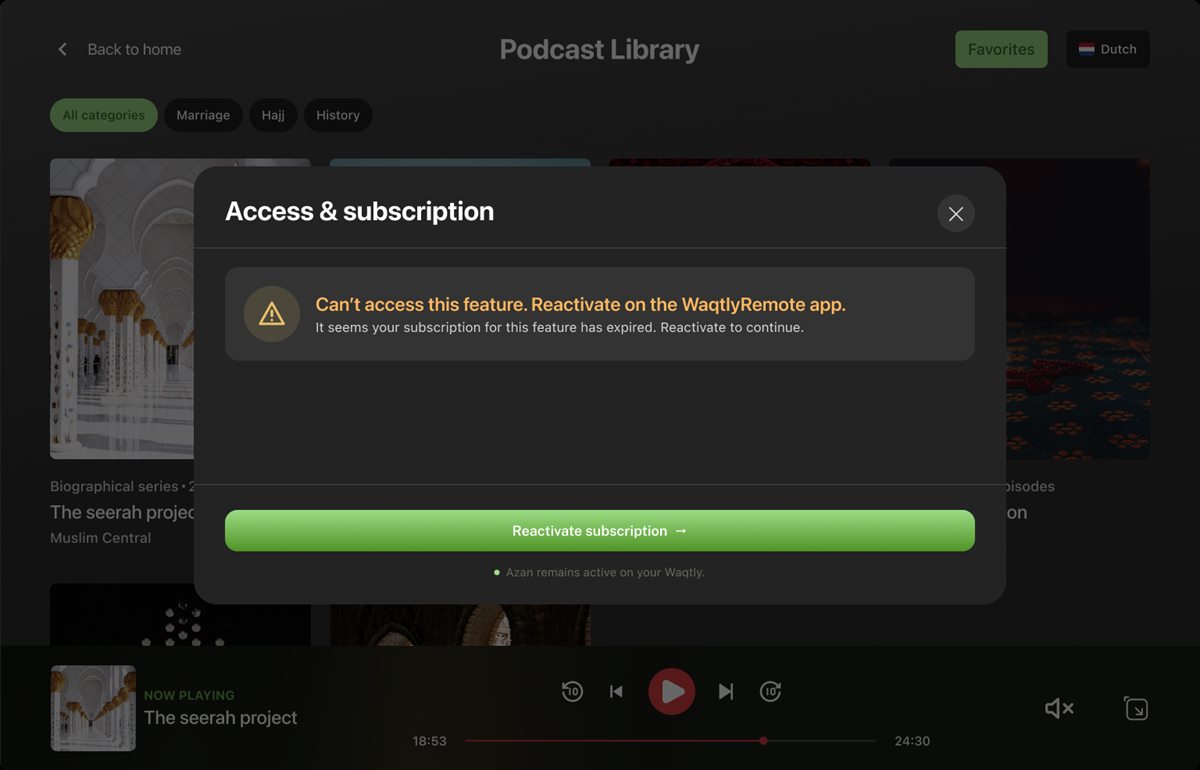
Each device has one access state. Locked features stay visible but faded; tapping one explains why and links to the Remote app. Azan, prayer times and the clock always work.
Offline-first entitlements
The tablet checks in on launch and caches its entitlement for 24 hours (weekly for Lifetime and Original access). If the connection drops, the Azan keeps working.
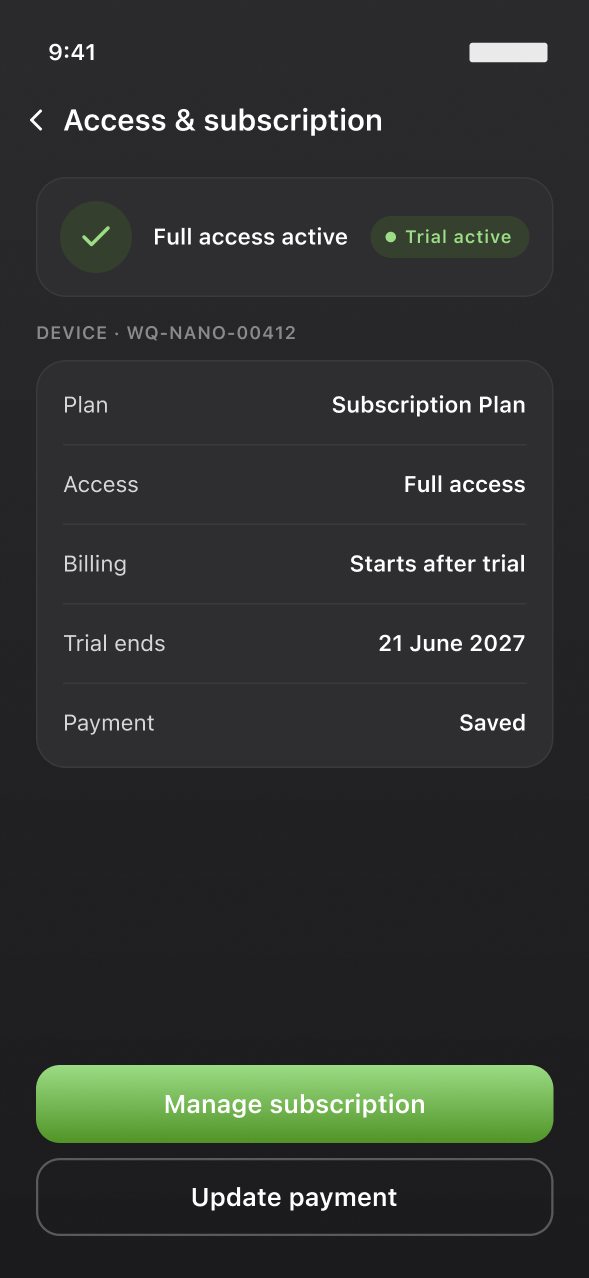
Access & subscription in the app
The Remote app shows plan, access, billing and payment for each linked device, with flows to manage, cancel, reactivate and update payment.
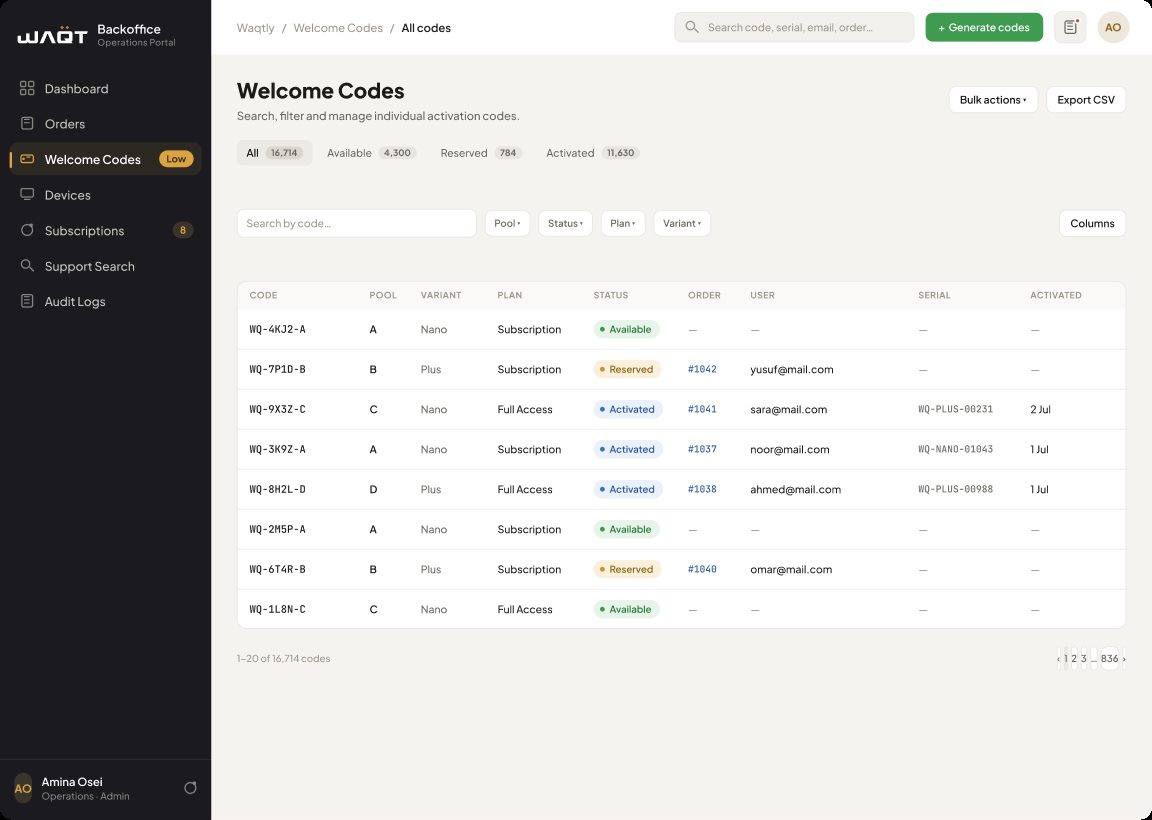 09 · Operations
Back office
An operations portal for orders, Welcome Code pools, devices, subscriptions, support search and an audit log, with manual overrides for support cases and pool-level alerts.
Activation for gifts
A code is linked to the order, not to the buyer. The person who activates the device with their own email becomes the account holder, and the included months start at activation, not at purchase.
Lifecycle emails
Order confirmations include a Welcome Code for each device, labelled by model. Reminders are sent before the included months end. Payment emails ask the user either to add a card or to update a card that failed.
Existing owners kept full access
Every device sold before launch was flagged as grandfathered in the CRM, so it gets full access without registration or a new account.
Device access states
The tablet reads its entitlement from the CRM. The CRM keeps each device's state in sync with Stripe through webhooks, and the tablet caches the result.
trial_activeactive_recurringlifetimegrandfatheredexpiredSee the subscription flow in action.
A live, embedded prototype of the customer subscribe-and-manage journey.
Building a connected product?
We design and build the device interface, the app and the systems behind them.